
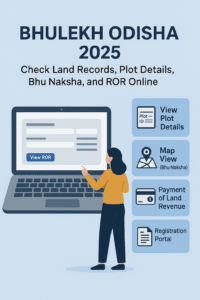
Bhulekh Odisha is a digital land record portal developed by the Revenue and Disaster Management Department, Government of Odisha, in collaboration with the National Informatics Centre (NIC).
The portal provides citizens with online access to crucial land-related information including land ownership, plot size, land type, and geographic location. It was launched in 2008 under the Digital India Land Records Modernization Programme (DILRMP) to replace manual land record systems with online data management.
The platform offers transparency, reduces paperwork, and helps people avoid middlemen or repeated visits to Tehsil offices.
Quick Answer: To check Bhulekh Odisha plot details, open the official portal bhulekh.ori.nic.in, choose View ROR, select your District, Tehsil and Village, and search in any of three ways — by tenant name, by Khatiyan (Khata) number, or by plot number. You can then view and download the ROR and see the plot on the Bhu Naksha map.
🔗 Quick Access – Bhulekh Odisha 2026 Services
Key Services Available on Bhulekh Odisha
Here are the major services citizens can access through the Bhulekh Odisha official website (https://bhulekh.ori.nic.in):
- 🔹 ROR (Record of Rights) View – Check property ownership details by Khatian, Plot, or Tenant name.
- 🔹 Bhu Naksha (Land Map) View – View digital cadastral maps showing plot boundaries.
- 🔹 Land Revenue Payment (e-Pauti) – Pay land tax or Khajana online.
- 🔹 Mutation Record Check – Track ownership change applications and updates.
- 🔹 Tehsil Information – Get contact details and jurisdiction of your local Tehsil office.
- 🔹 RCCMS (Revenue Court Case Monitoring System) – View ongoing land dispute cases.
These services simplify land management, making the process more transparent and user-friendly for every citizen of Odisha.
How to Check Bhulekh Odisha Land Records Online
You can view your land details and ownership records (ROR) in just a few minutes. Follow these simple steps:
Step 1: Visit the Official Website
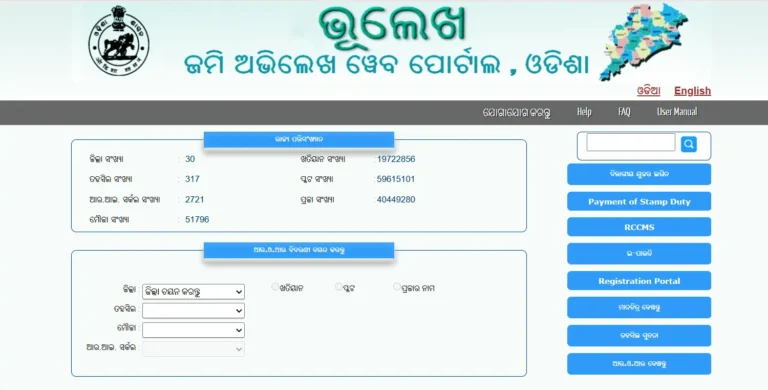
Go to https://bhulekh.ori.nic.in — the official Bhulekh Odisha website.
Step 2: Select Your District
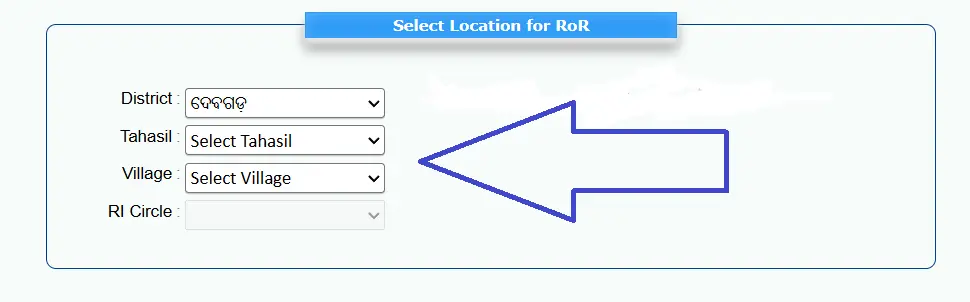
On the homepage, choose your district from the dropdown menu.
Step 3: Choose Search Option
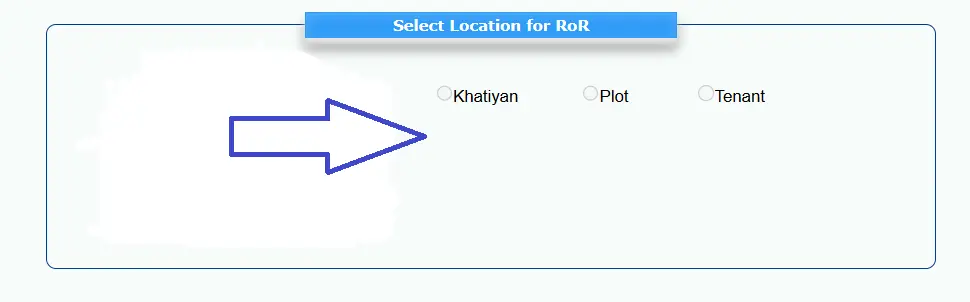
You can search land records in three ways:
- By Khatiyan Number
- By Plot Number
- By Tenant Name
Step 4: Enter Land Details
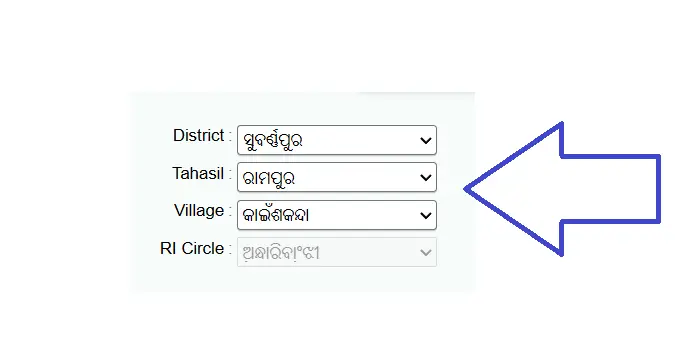
Select your Tahasil, Village, and RI Circle, then enter the relevant details (Khatiyan, Plot, or Tenant).
Step 5: View Record of Rights (ROR)
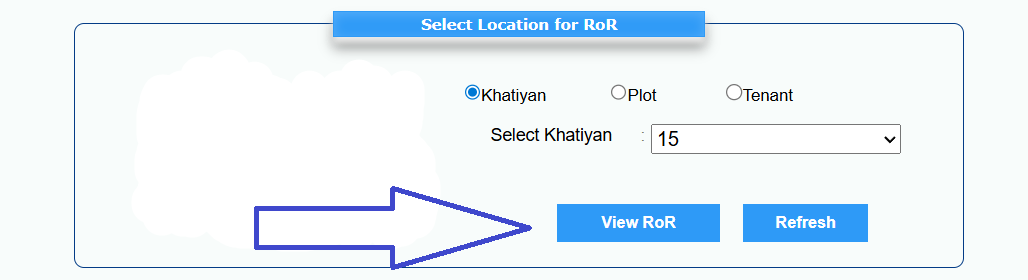
Click “View ROR” to see complete details, including:
- Landowner’s name
- Plot number and area
- Land classification
- Mutation and tax information
Step 6: Download or Print
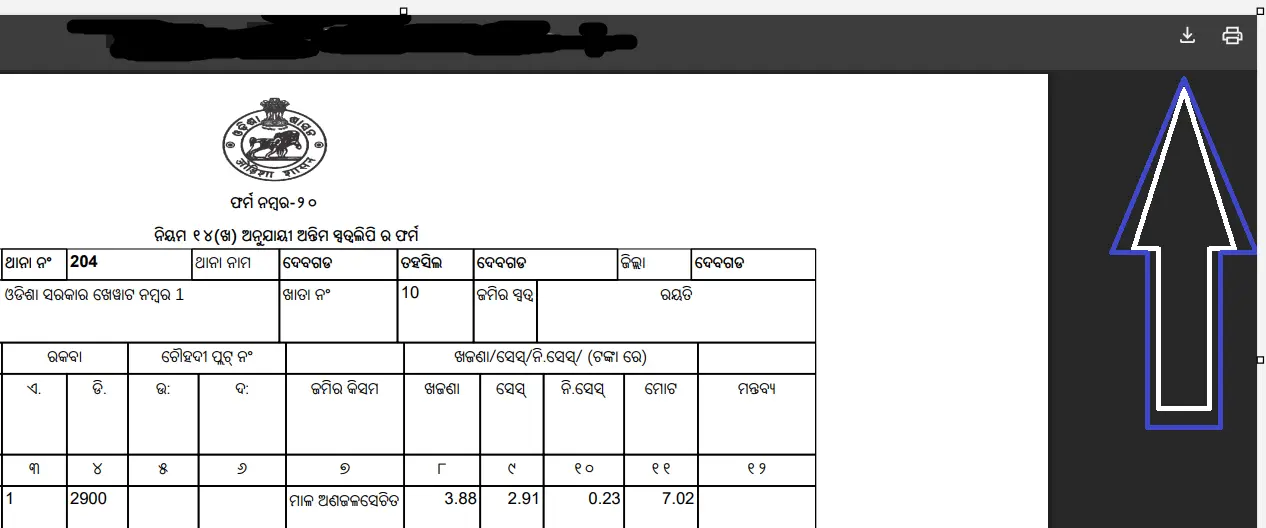
Once your land record appears, click on “Print” or “Save as PDF” to download your land details for future reference.
Check Bhulekh Odisha Plot Details by Name, Khatiyan Number and Plot Number
Most people come to Bhulekh Odisha for one thing: the details of a single plot. The portal lets you reach the same record in three ways, so you can start from whatever you actually know — the owner’s name, the Khatiyan number, or the plot number itself. In every case, first open bhulekh.ori.nic.in, choose View ROR, and select your District, Tehsil and Village.
Bhulekh Odisha Plot Details by Name (Tenant Name Search)
- On the ROR search page, after selecting District, Tehsil and Village, choose the Tenant search option.
- Type the land owner’s (tenant’s) name exactly as it appears in the land records. If the English spelling does not match, try the common spelling variations used in your village records.
- Submit the search. All Khatiyans recorded under that name in the selected village are listed.
- Open the correct Khatiyan to see its plots, or select a plot to view the full plot details and the ROR.
Plot Details by Khatiyan (Khata) Number
- Choose the Khatiyan search option on the ROR page.
- Enter the Khatiyan number printed on your old ROR, sale deed or land receipt.
- The Khatiyan opens with the tenant’s name and the list of plots under it — plot number, area, land type (kisam) and rent for each plot.
Plot Details by Plot Number
- Choose the Plot search option.
- Enter the plot number. If a plot has been subdivided, enter it in the format shown on your document (for example, the main plot number and its subdivision).
- The plot details show the tenant’s name, Khatiyan number, area, kisam (land type) and the recorded rent/cess for that plot.
What plot details show: tenant (owner) name, Khatiyan number, plot number, plot area, land type (kisam), and the rent recorded against the plot. If a detail looks wrong — a misspelt name, wrong area or an old owner’s name — that is corrected through a mutation or correction application at your Tehsil office, not on the portal itself.
Download Bhulekh Odisha ROR (Record of Rights)
Once you have opened a record using any search above, use the portal’s print/download option to save the ROR as a PDF or print it directly. The ROR has two parts: the front page carries the tenant’s name, Khatiyan and plot details, area and land type; the back page carries remarks and the record of past changes (mutations) on that Khatiyan.
The downloaded ROR is suitable for information and most everyday uses, such as checking ownership before buying land. For court matters, bank loans or any use where a certified copy is demanded, apply for a certified copy of the ROR at your Tehsil office.
How to View Bhu Naksha (Land Map) on Bhulekh Odisha
The Bhu Naksha Odisha feature lets you view the digital map of your land, including boundaries and plot layout. This is extremely helpful when verifying property locations or resolving boundary-related disputes.
Here’s how you can check your Bhu Naksha Odisha map online:
Step-by-Step Process
- Visit the official map website – https://bhunakshaodisha.nic.in
- Choose your District from the dropdown and click Submit.
- On the next page, select your Tehsil, RI Circle, and Village.
- Choose your Sheet Number to view the detailed map.
- Click on your specific Plot Number to see ownership, area, and land classification.
- You can also click on “Show Report PDF” to download or print the land map report.
💡 Tip: For SEO image optimization, upload a labeled screenshot with alt text:
“Bhulekh Odisha Bhu Naksha Map 2026 – Check Land Map Online”
How to Pay Land Revenue Online (e-Pauti Portal)
Gone are the days when landowners had to visit government offices for paying land tax (Khajana). Now, you can make payments easily through the e-Pauti system available on the Bhulekh Odisha portal.
Steps to Pay Land Revenue Online
- Visit the official website: https://bhulekh.ori.nic.in
- On the homepage, click on “Payment of Land Revenue”.
- You’ll be redirected to the Odisha Land Revenue Portal – https://odishalandrevenue.nic.in.
- Click on “Pay Land Revenue” and fill in your details like:
- District, Tahasil, and Village
- Khatiyan or Plot Number
- Owner’s Name
- Revenue amount
- Choose your payment method (Debit/Credit Card, Net Banking, or UPI).
- After successful payment, download or print your e-receipt for records.
* You can also check your transaction ID or payment status on the same portal by clicking “Know Your Transaction ID”.
How to Check Mutation Status on Bhulekh Odisha
Mutation refers to the process of updating ownership details in land records after a property transfer through sale, inheritance, or gift.
Steps to Check Mutation Status
- Visit https://bhulekh.ori.nic.in
- Go to the ROR section and enter your Khatiyan or Plot Number.
- The portal will display whether the mutation request has been updated or is still pending.
- You can also check mutation updates at your respective Tehsil office.
Bhulekh Odisha Portal Overview (2026 Update)
Feature | Details |
Portal Name | Bhulekh Odisha |
Department | Revenue & Disaster Management Department, Govt. of Odisha |
Launch Year | 2008 |
Tech Partner | National Informatics Centre (NIC) |
Districts Covered | 30 |
Tehsils Integrated | 317 |
Villages Digitized | 51,000+ |
Total ROR Entries | 1.6 Crore+ |
Registered Plots | 5.6 Crore+ |
Mutation Cases Processed Annually | 4.5 Lakh+ |
Average Daily Users | 1.5 Lakh+ |
Official Website |
Benefits of Bhulekh Odisha for Citizens
The Bhulekh Odisha Portal offers multiple benefits that make it a must-use tool for every landowner in Odisha:
- Transparency: Land records are available online with complete accuracy.
- Time-Saving: No more waiting at Tehsil offices. All details are just a click away.
- Free Access: Basic record viewing is free of cost.
- Secure Payments: Land tax can be paid safely online through e-Pauti.
- Dispute Reduction: Clear digital records help prevent ownership disputes.
- Easy Documentation: Download or print ROR and land maps anytime.
Other Services Available on Bhulekh Odisha
- RCCMS (Revenue Court Case Monitoring System)
This feature helps you check details of ongoing or resolved revenue-related court cases in Odisha.
Visit http://odisha.landrevenue.nic.in and search by case number or party name.
- Tahasil Information
The portal provides details of your local Tehsil office, including:
- Contact numbers
- Jurisdiction area
- Office address
This helps citizens find where to file applications or verify documents.
- Land Revenue & Stamp Duty
You can calculate and pay stamp duty and registration fees for new property registration directly from the linked registration portal of Odisha.
Bhulekh Odisha Contact & Helpline Information
Department / Office | Contact Details |
Director, Land Records & Survey, Board of Revenue, Cuttack | |
Helpline (Revenue Dept.) | 📞 0671-2509582 (10 AM – 5:30 PM) |
Revenue Minister Helpline | |
Toll-Free Number | ☎️ 1800-121-8242 |
Official Website |
How to Check Bhulekh Odisha Land Records Online-Short Youtube Video Explainer
Frequently Asked Questions (FAQs)
What is Bhulekh Odisha?
Bhulekh Odisha is an online portal by the Government of Odisha that provides access to digital land records, including ROR, plot details, and Bhu Naksha.
Is the Bhulekh Odisha portal free to use?
Yes, viewing land records online is completely free. However, certified copies of ROR may require a nominal fee.
What is ROR (Record of Rights)?
The ROR is an official land document showing ownership, land type, area, and tax details.
Can I check land maps through Bhulekh Odisha?
Yes, by visiting https://bhunakshaodisha.nic.in, you can view and download your digital cadastral land map.
What is e-Pauti in Odisha?
e-Pauti is the online system that allows landowners to pay their annual land revenue (Khajana) online securely.
What should I do if the Bhulekh website is not working?
Try clearing browser cache or using another browser. If the issue persists, contact the helpline at 0671-2509582.
Manish is the content curator at OnlineChallanChecker.com, a trusted platform for checking challan status, payment updates, and traffic fine information across India. With over 5 years of experience in digital content creation and online service platforms, Admin is committed to delivering accurate, easy-to-understand guides that help users manage their challans effortlessly.